
Last active
October 24, 2020 10:52
-
-
Save florindumitru/0839388333ecfba9d90f8cac4ac002b4 to your computer and use it in GitHub Desktop.
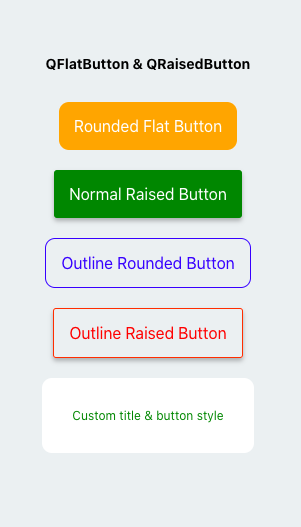
Simple React native buttons (Flat and Raised)
This file contains hidden or bidirectional Unicode text that may be interpreted or compiled differently than what appears below. To review, open the file in an editor that reveals hidden Unicode characters.
Learn more about bidirectional Unicode characters
| import * as React from 'react'; | |
| import { Text, View, StyleSheet } from 'react-native'; | |
| import Constants from 'expo-constants'; | |
| import {QFlatButton,QRaisedButton} from './components/qbuttons'; | |
| export default function App() { | |
| return ( | |
| <View style={styles.container}> | |
| <Text | |
| style={{textAlign: "center", marginBottom: 20, fontWeight: "bold"}} | |
| > QFlatButton & QRaisedButton </Text> | |
| <QFlatButton | |
| onPress={()=>null} | |
| rounded | |
| title="Rounded Flat Button" | |
| backgroundColor="orange" | |
| titleColor="white" | |
| /> | |
| <QRaisedButton | |
| onPress={()=>null} | |
| title="Normal Raised Button" | |
| backgroundColor={"green"} | |
| titleColor={"white"} | |
| /> | |
| <QFlatButton | |
| onPress={()=>null} | |
| rounded | |
| outline | |
| borderColor="blue" | |
| title="Outline Rounded Button" | |
| titleColor="blue" | |
| /> | |
| <QRaisedButton | |
| onPress={()=>null} | |
| title="Outline Raised Button" | |
| outline | |
| borderColor="#fc4903" | |
| titleColor={"red"} | |
| /> | |
| <QFlatButton | |
| onPress={()=>null} | |
| rounded | |
| // outline | |
| borderColor="red" | |
| title="Custom title & button style" | |
| backgroundColor="white" | |
| titleColor="green" | |
| titleStyle={{fontSize: 12}} | |
| style={{padding: 30}} | |
| /> | |
| <Text | |
| style={{textAlign: "center", marginTop: 20,}} | |
| > </Text> | |
| </View> | |
| ); | |
| } | |
| const styles = StyleSheet.create({ | |
| container: { | |
| flex: 1, | |
| justifyContent: 'center', | |
| paddingTop: Constants.statusBarHeight, | |
| backgroundColor: '#ecf0f1', | |
| padding: 8, | |
| }, | |
| paragraph: { | |
| margin: 24, | |
| fontSize: 18, | |
| fontWeight: 'bold', | |
| textAlign: 'center', | |
| }, | |
| }); |

Author
florindumitru
commented
Oct 24, 2020
Sign up for free
to join this conversation on GitHub.
Already have an account?
Sign in to comment